
“WTF was I just working on?”
Five AI chats, three terminals, a Slack ping — and your brain just blue-screened. Mac Track is the rewind button: a tiny menu bar app that remembers what you were doing, because you clearly don’t anymore.
Local-first. No screenshots. No keystroke tracking.
Apple Silicon (M-series) Macs only — Intel build coming later.
Context switching is the new brain rot.
AI was supposed to make you smarter. Instead you babysit five chats, tab between agents, juggle terminals — and forget what you were doing ninety seconds ago. Your short-term memory got killed by AI. Mac Track outsources it back to your Mac, where it apparently belongs now.
How it works
Tracks your active context
Mac Track watches which app and window is currently active.
Ignores accidental clicks
If something is focused for less than a few seconds, it is ignored.
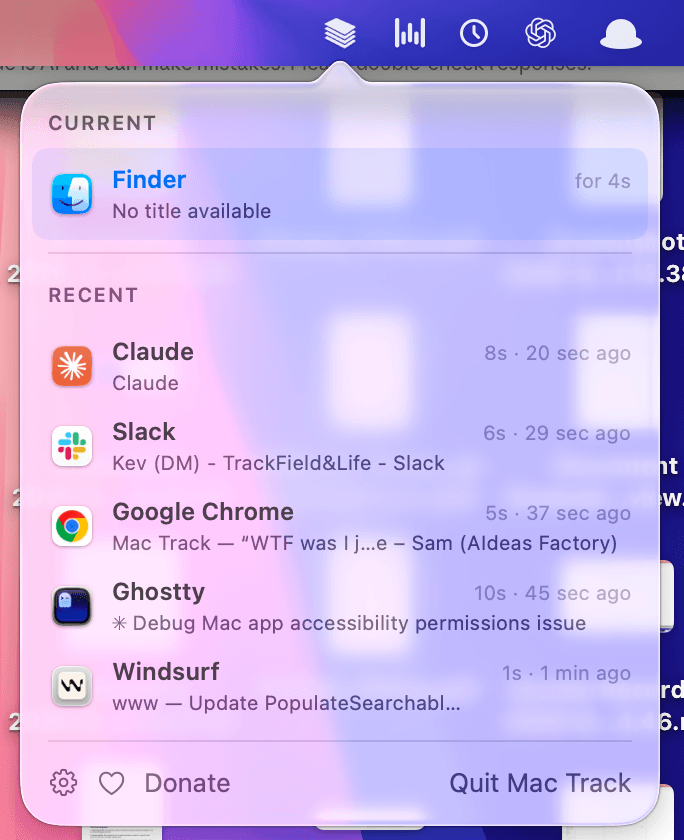
Shows your last five contexts
Click the menu bar icon and instantly see where you were.
Built to be private from day one.
- Stored locally on your Mac
- No screenshots
- No keyboard recording
- No browser history capture
- No cloud sync by default
- Ignore sensitive apps
Mac Track records context, not content.
Made for modern messy work.
Built for brains running on 3% battery.
Small app, one job: keep track of where your head was, so you don’t have to.
Core tracking
- Context capture engine — app + window title, polled every second, stored locally in SQLite
- Adjustable dwell time (1–15s) so a two-second glance doesn't count
- Capture pauses while your screen is locked — breaks don't pollute history
The popover
- Current + recent contexts with real app icons
- Session durations — “for 12m” on the live row, so deep work stands out from detours
- Click any row to jump back to the exact window you were in
- Right-click any app to ignore it forever
“Where was I?”
- Unlock your Mac after a break and a notification lists your last 3 contexts
- One click reopens the popover — and your train of thought
Getting at it
- Global hotkey — ⌃⌥M by default, recordable to whatever you like
- Launch at login, set and forget
Privacy by default
- Password managers and system UI are built-in unrecordable
- Your own per-app denylist, self-healing on every launch
- Everything stays on your Mac. No cloud. Ever.
Let your Mac remember. You’ve clearly given up.
Enter your email and we’ll send the download link straight to your inbox — before you forget why you came here.
Built for macOS on Apple Silicon (M1 and later). Lightweight, private, and focused on one job: helping you remember what you were doing. Intel support is on the roadmap.